
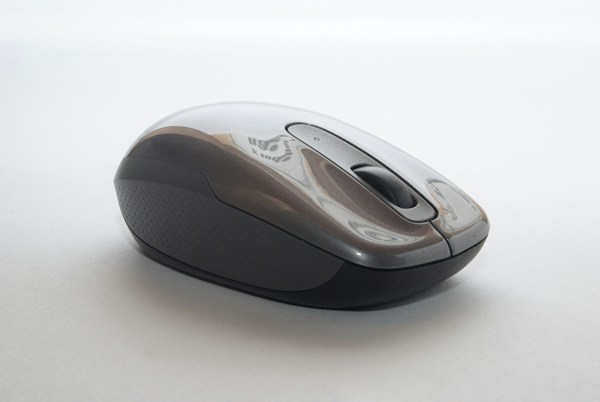
ClickPro Silent Wireless Mouse for Laptop is made for people who want quiet work anywhere. Loud mouse clicks can disturb colleagues, family, and library users, and a cable can limit where you work. In this honest review, we look at how silent clicks and long battery life can improve daily laptop use, and who will benefit most.
If you work in a shared office, a library, a coffee shop, or at home late at night, quiet equipment makes a real difference. A silent mouse lets you work without drawing attention to every click, while wireless design lets you use your laptop comfortably in different places.
What Is It?
This is a wireless mouse designed for laptops. It connects without a cable, so you can move it freely on a desk, a table, or a lap tray. The silent click design reduces the sound of left and right clicks, making it suitable for quiet environments and long working sessions.
It is best understood as a practical everyday mouse rather than a specialist gaming product. Its value comes from comfort, quiet use, and dependable wireless performance for office work, study, browsing, and video calls.
Key Features
- Silent clicks: quieter left and right clicks for shared offices, libraries, and late-night work.
- Wireless laptop design: no cable to tangle, so you can work comfortably in different places.
- Long battery life: made for extended use without frequent battery changes or charging.
- Comfortable shape: a practical design for daily use during long work and study sessions.
- Smooth everyday tracking: suitable for documents, spreadsheets, browsing, and presentations.
- Simple setup: easy to connect to a laptop and start using straight away.
Who Is It Best For?
This mouse is a good fit for office workers, students, remote workers, and travellers. If you work in a quiet room, silent clicks help you stay polite to others. If you move between desks, wireless design makes setup quick and simple. It is also useful for parents working at home while children sleep.
Who Should Skip It?
Skip this mouse if you need a high-performance gaming mouse with extra buttons and very fast response, or a large ergonomic mouse for serious wrist problems. It is made for everyday quiet work, not for competitive gaming or specialist medical use.
Comparison: How Does It Compare?
Compared with a wired mouse, a wireless silent mouse offers more freedom and less noise. You do not need to manage a cable, and clicks are far quieter. Compared with a laptop trackpad, a mouse is usually more comfortable for long sessions and more precise for documents and spreadsheets.
Compared with a gaming mouse, this type of mouse is simpler and quieter, but it lacks extra gaming buttons. For most office and study users, that simplicity is a benefit, not a drawback.
Buying Guide: What to Check Before You Buy
First, check comfort and size. The mouse should fit your hand and feel natural after an hour of use. Second, check battery type and life. Long battery life saves time and avoids interruptions. Third, check connectivity. It should connect reliably to your laptop without dropping out.
Also consider your working surface. A mouse should track smoothly on your desk or mat. Check the return policy before you buy, and avoid choosing on silence alone. A good mouse should feel comfortable, track smoothly, and work quietly in your normal environment. You can also browse more everyday picks on the Shop page.
Pros and Cons
Pros
- Silent clicks for quiet work anywhere.
- Wireless design for flexible laptop use.
- Long battery life for extended sessions.
- Comfortable for daily office and study work.
- Simple setup and everyday reliability.
Cons
- Not designed for competitive gaming.
- Needs batteries or charging over time.
- May feel small for very large hands.
- Wireless connection depends on the receiver or Bluetooth.
Frequently Asked Questions
Are silent mice really quiet?
Silent mice are designed to reduce click noise a lot, but they are not completely silent. The click is much softer than a standard mouse, which is usually enough for shared spaces.
Is a wireless mouse good for a laptop?
Yes. Wireless mice are popular for laptops because they are portable, easy to set up, and comfortable for longer work than a trackpad.
How long does the battery last?
Battery life depends on use, but a mouse designed for long battery life should last through many work sessions. Check the product details for the specific model.
Can I use it on any surface?
Most wireless mice work well on a desk or mouse mat. Very shiny or glass surfaces can be less reliable, so a mat helps.
Is it good for students?
Yes. Students often work in libraries and shared rooms, where quiet clicks and portable wireless use are especially useful.
Final Verdict
ClickPro Silent Wireless Mouse for Laptop is a strong everyday choice for quiet, flexible work. It offers silent clicks, long battery life, and a comfortable wireless design for office, study, and travel. It is not a gaming mouse, but for daily laptop use it is well suited.
If you want quiet work anywhere without a cable, this is an easy recommendation. For another desk essential, see our SoundCore Wireless Noise Cancelling Headphones review.
2 thought on “ClickPro Silent Wireless Mouse for Laptop”